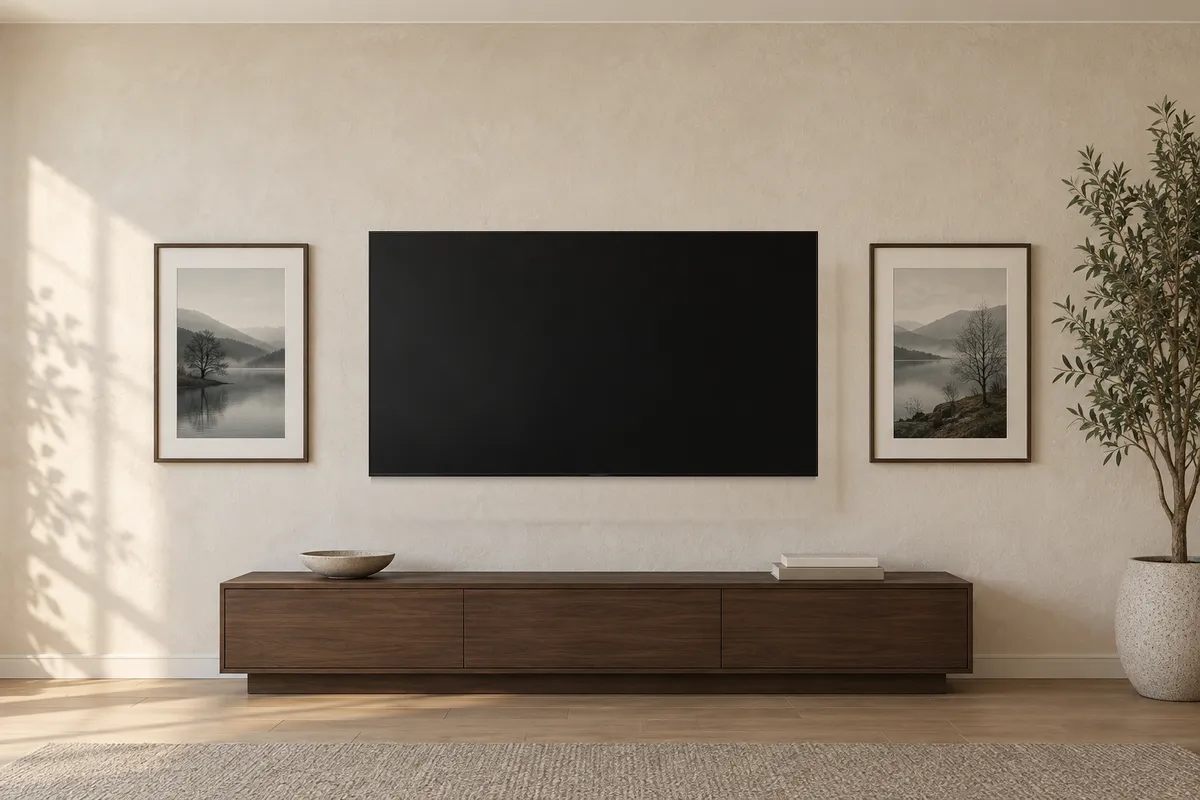
Why does the TV decide where the art goes?
Because it is the one thing on that wall you cannot nudge by eye. A frame can move up or down on a whim. A TV comes with a bracket, a cable run and a viewing height, so it goes up first and the art takes its lines from it.
Samsung’s US support article, Things to consider before mounting your Samsung TV to a wall, gives two ways to set that height. The first is to sit in your usual spot and have a friend measure from the floor to your eye level. The fallback, if that is too much trouble, is this:
you can mount your TV 42 inches from the floor to the center of the TV. This should meet the approximate eye level of someone who is 5 feet 6 inches tall and sitting on a standard couch.
In centimetres, that is 106.7 cm to the middle of the screen, for a seated viewer who stands 167.6 cm tall. The page adds that “you can mount it a little lower if needed, based on the viewers’ height”, and that if the default leaves no room for a cabinet underneath, you should “mount the TV about 4 to 6 inches above the furniture”, which is 10.2 to 15.2 cm.
Two things to hold onto. These are Samsung’s figures, written for Samsung’s TVs on a support page that shows no date, and read for this guide on 14 September 2026. They are not an industry standard, and this guide did not check what any other TV maker publishes. And your own measured eye height beats a default built on one assumed viewer, which is why the page puts the measuring option first.
How big is the TV, on the wall?
Not the number in its name. That figure is neither the width nor the height of the set, and those are the two measurements a wall needs.
This guide’s example is Samsung’s Crystal UHD U8020H, a 2026 model that Samsung UK sells as a 65-inch set, a figure that converts to 165.1 cm and is still not a width or a height. Its product page lists the set without its stand at “1444.1 x 831.2 x 76.8 mm”, width by height by depth. On the wall, that is a screen 144.4 cm wide and 83.1 cm tall.
Hang it at Samsung’s default and the rest is our arithmetic, not Samsung’s. Half of 83.12 cm is 41.56 cm. Take that off 106.68 cm and the bottom edge sits at 65.12 cm. Add it and the top edge sits at 148.24 cm.
| Point on the example TV | Height from the floor |
|---|---|
| Bottom edge | 65.1 cm |
| Middle of the screen | 106.7 cm |
| Top edge | 148.2 cm |
This is the only step that changes when you swap in your own TV. Look up the set’s height without its stand, halve it, and add it to and subtract it from your centre. Those two edges are where all three options begin.
Above the TV: how much wall does it take?
More than it looks, because art above a screen stacks on top of everything else.
The gap comes first. A Homes & Gardens piece by Millie Hurst, published on 5 September 2023, answers the question “How high should art be above the TV?” with a quote from Jacky Chou, principal and director at Archute, which the article describes as a magazine about architecture, home and garden: “I would suggest leaving at least 6 inches of space between them.” That is 15.2 cm between the top of the TV and the bottom of the art.
On the example set, 148.24 cm plus 15.24 cm puts the lowest the art can start at 163.5 cm.
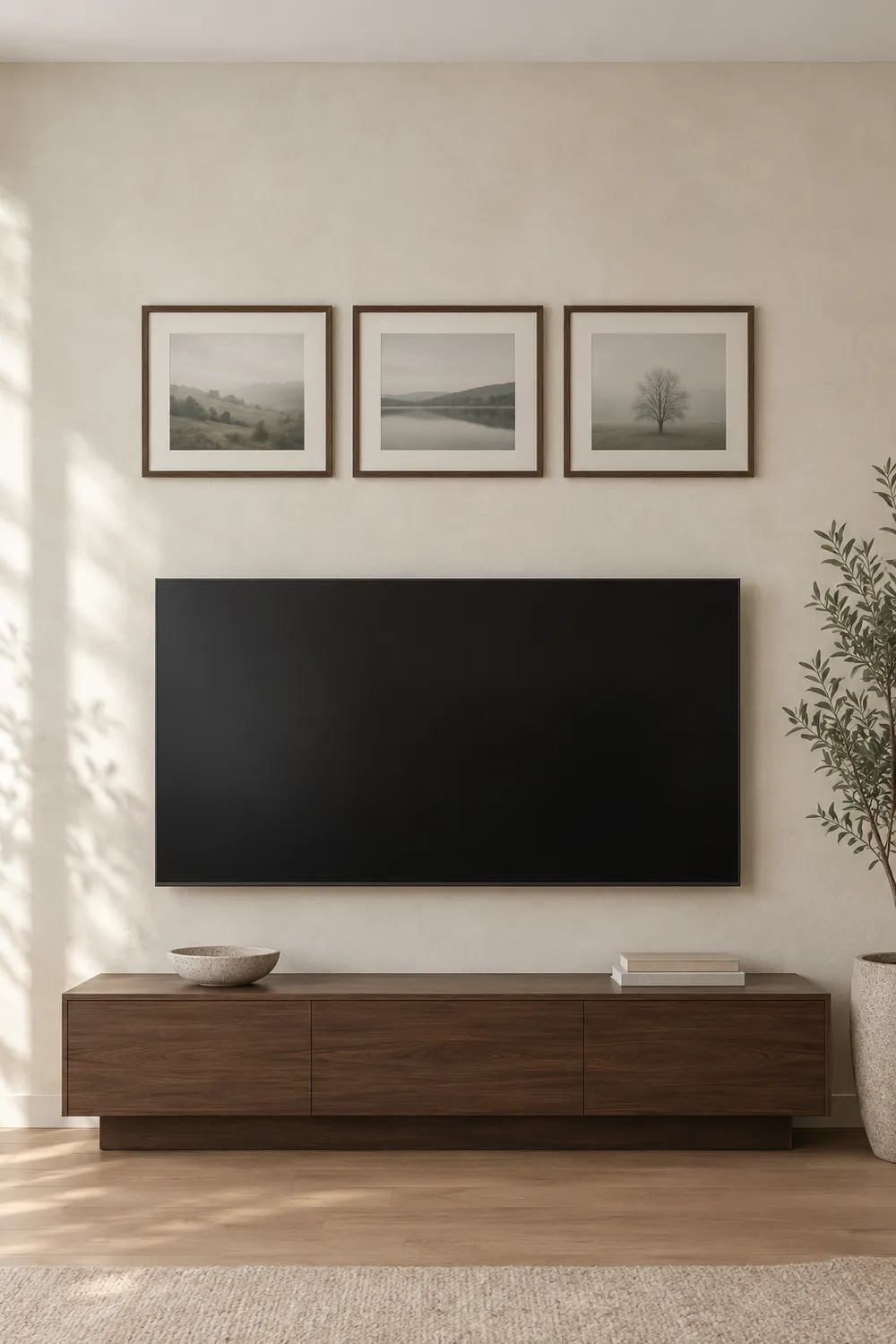
What goes up there matters as much as where. Zara Stacey, a content editor at Homes & Gardens, gives the most useful rule in the piece: “I’d avoid placing one piece of art above the TV but opt for an odd number instead.” One frame over a wide black screen tends to look like an afterthought. Three looks like a decision.
Here is a row that fits the example set. Three 40 × 30 cm frames, hung landscape, with the 5 to 8 cm gap from our salon hang guide between them, make a row 130 to 136 cm wide, which sits inside the screen’s 144.4 cm. Its bottom edge goes at 163.5 cm and its top edge lands at 193.5 cm. The frame size is our choice for the example, and so is the arithmetic.
If you cannot settle on what goes there, Stacey also suggests a shelf above the TV “so that you can easily swap out artwork and decor pieces as you so wish”. Either way, measure floor to ceiling before you buy frames for this option. The top of that row is at 193.5 cm, and the wall above it still needs some air.
Beside the TV: how do you make it read as a set?
Stacey again, in the same article: “if you want to make a wall-mounted TV less of a focal point, consider arranging frames on either side to make a triptych”. A triptych is three panels read as one piece, and on this wall the TV is the middle panel whether you planned it or not.
What makes three panels read as one is a shared centre line. It is the same idea as the “on center” in our guide to hanging height: you place the middle of a picture, not its top. Beside a TV, the middle you line up with is the screen’s. Hang each side frame so its middle is level with the middle of the screen.
Take two 50 × 70 cm frames, hung upright. With their middles at 106.7 cm, each bottom edge sits at 71.7 cm and each top edge at 141.7 cm. That is 6.6 cm inside the TV’s own bottom and top edges, which is what makes the three panels look planned rather than scattered.
Now the width. Chou’s 15.2 cm was given for the space above a TV. Using it at the sides as well is our extension of his advice, not something he said. With it, the set spans 144.41 cm of screen, two gaps of 15.24 cm and two 50 cm frames, which comes to 274.89 cm, so 274.9 cm of clear wall. Measure that before you buy, and keep both gaps identical. A triptych that is a few centimetres out on one side looks a lot more than a few centimetres out.
This is also the only option where Chou’s other advice can be followed literally. In the same answer he says “you should hang your art at eye level or slightly lower when you are sitting on your sofa”. At Samsung’s default, the middle of the screen is at seated eye level, so frames that share its centre line are there too. Art above the TV cannot be.
If those two frames went up at the 144.8 cm centre from our hanging-height guide instead, their middles would sit 38.1 cm above the middle of the screen, and the wall would read as a TV with two pictures near it rather than as one set of three.
Around the TV: how do you keep it from looking busy?
This is the option with the most freedom, and the one most likely to go wrong.
Alex Bass, an art curator and interior designer quoted in the Homes & Gardens piece, built one around her own TV: “I recommend something that will not distract your eye too much. I opted for framed black and white photographs.” On the layout, she says “Don’t be afraid of creating a gallery wall”, and then gives the step that saves the most nail holes: “Play with the framing and lay it out on your floor first.”
Stacey’s warning is the counterweight. Step back and ask whether the wall has tipped into busy, “after all, we turn on the TV to relax and switch off”.
The method that keeps it calm is the one from our salon hang guide, which builds a gallery wall outward from a single anchor piece. Around a TV, the anchor has already been chosen for you. Keep 5 to 8 cm between frames, as that guide recommends, and keep the wider 15.2 cm between the screen and every frame next to it, so the TV reads as the centre of the group rather than as one more frame crowded by its neighbours. That wider gap on the sides is our extension of Chou’s figure.
Put the two worked examples together, the pair of 50 × 70 cm frames beside the screen and the row of three 40 × 30 cm frames above it, and the whole arrangement is 274.9 cm wide. It runs from 65.1 cm at the bottom of the screen to 193.5 cm at the top of the row, which is 128.4 cm of wall from top to bottom. That makes five frames, an odd number, so Stacey’s rule survives the combination.
Before a nail goes in, cut paper to the outer size of each frame and tape the templates up around the TV. Live with them for a day. Paper costs nothing, and holes in the wall beside a mounted TV are harder to hide than most.
The three options, side by side
Every figure below is for the example set hung at Samsung’s default centre, with this guide’s example frames. The method carries over to any TV. The numbers do not.
| Above | Beside | Around | |
|---|---|---|---|
| Frames in the example | Three, 40 × 30 cm | Two, 50 × 70 cm | Five, both sets combined |
| Wall width used | 144.4 cm, the TV’s own | 274.9 cm | 274.9 cm |
| Highest point | 193.5 cm | 148.2 cm, the top of the TV | 193.5 cm |
| Gap to the screen | At least 15.2 cm above | 15.2 cm each side, our extension | 15.2 cm wherever a frame meets the screen, our extension on the sides |
| Advice it rests on | Chou’s gap, Stacey’s odd number | Stacey’s triptych | Bass’s floor layout, our salon hang method |
What if the TV is over a fireplace?
Samsung’s US page has a view on that, and it is not a mild one: “We do not recommend mounting your TV over a fireplace. Your primary concern will be the heat; Samsung TVs should never exceed 104°F.” That is 40°C. The page tells you to light a fire and check the temperature first, warns that ash from a wood-burning fireplace could accumulate on the TV and its vents, and notes that a TV above a fireplace “will be well above eye level when you’re sitting down”, suggesting a mount that can be angled to make it easier on your neck.
Samsung’s support page for the United Arab Emirates, last updated on 25 June 2026, words the same question differently: “Mounting your Samsung TV above a fireplace is possible but requires careful consideration.” It asks you to “ensure the temperature does not exceed 40°C”, to test the heat output before mounting, and it repeats the points about ash and neck strain. Same company, same temperature ceiling, two different verdicts. Keep them apart rather than blending them into one Samsung rule.
If the TV can move, the swap is worth weighing: the TV goes to a wall where its middle can sit at seated eye level, and the space over the mantel goes to art. That removes the neck problem both pages describe. It does not answer what a working fire does to a framed print. Samsung’s temperature figure is about its TVs, nothing read for this guide covers paper hung over a fireplace, and so this guide makes no claim either way.
Before you buy
Hang the TV first, or at least mark where it will go. Every number the art needs is measured from the screen’s edges.
Look up your TV’s width and height without its stand on the maker’s product page. The size in the name is neither.
Halve the height, then add it to and subtract it from your centre. That gives you the top and bottom edges, which is where all three options begin.
For above, leave at least 15.2 cm over the screen, choose an odd number of pieces rather than one, and measure to the ceiling.
For beside, put each frame’s middle level with the middle of the screen, keep the two gaps identical, and check that you have the full width.
For around, treat the TV as the anchor, keep 5 to 8 cm between frames and the wider gap next to the screen, and lay the whole thing out on the floor or in paper on the wall first.
And whichever you choose, pick art that is quieter than the screen. Bass’s framed black and white photographs are the easy version of that: calm pictures, simple frames, nothing competing with a black rectangle for attention. Stacey adds two finishing touches of her own, a large houseplant near the TV so the corner feels less technical, and a dark-toned TV console so the black of the screen looks intentional.
A TV is not the only screen that sets the line for the art near it. Our guide to the wall behind you on video calls does the same job for a desk and a webcam.
Pin this guide
Worth keeping if a TV wall is next on your list. The side-by-side table is the part to have open when you are standing in front of the wall with a tape measure.
Pin 1 of 2 — save to Pinterest 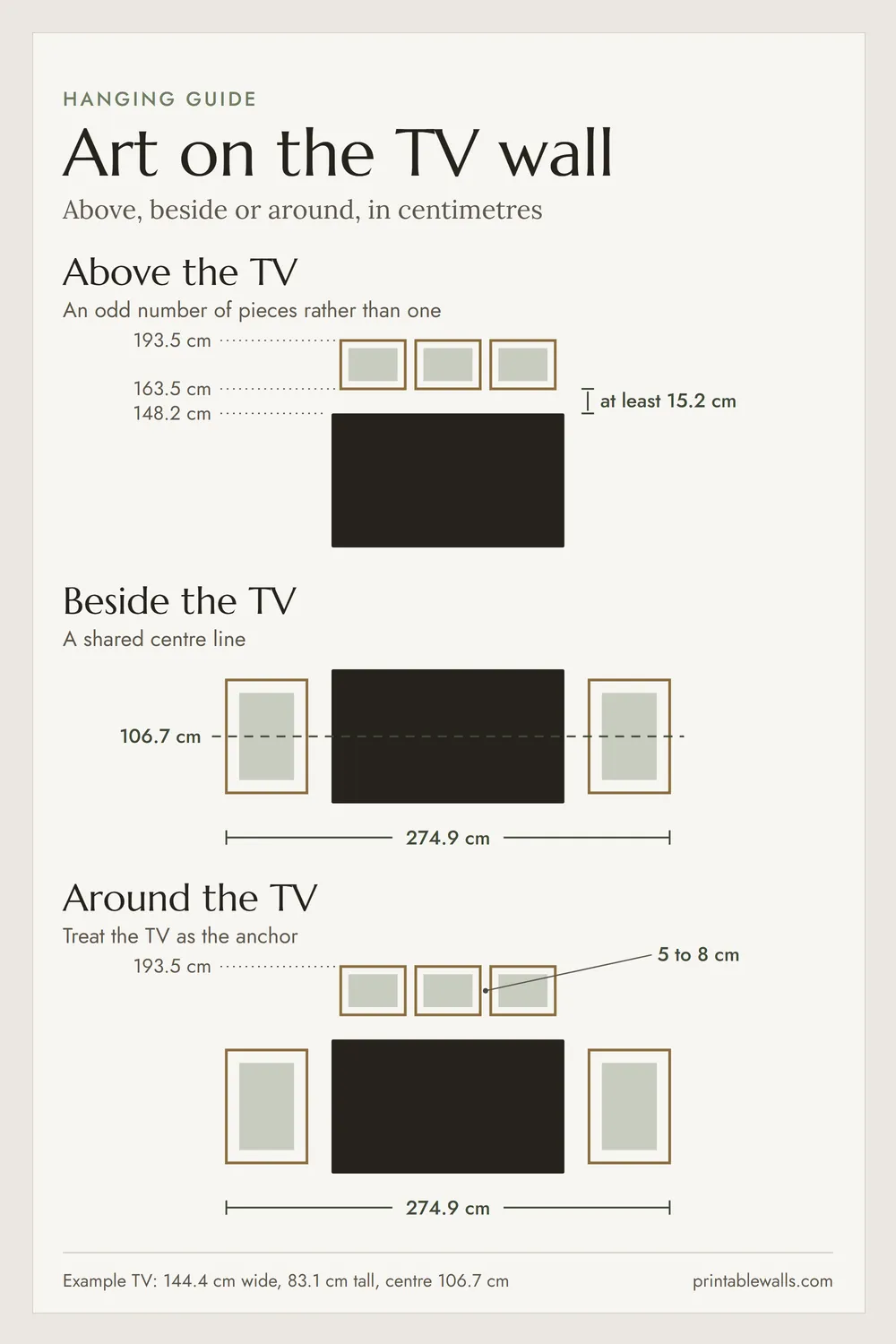
Pin 2 of 2 — save to Pinterest